When architects talk about IFC files, they are usually described as something technical, neutral, or simply something you export at the end of a project.
For a long time, I thought the same. To me, IFC was just another file format, like exporting a PDF or a DWG.
But when I started exploring IFC files more closely, I realized they are fundamentally different from how most architectural software stores information. And more importantly, they don’t behave the way we expect if we are used to working in tools like Revit, Archicad, or Rhino.
This article is a simple attempt to explain what an IFC file actually contains.

© 2026 Naveen Maria Fleming / ArchitectsWhoCode, AI-generated illustration
Think of an IFC File as a Description, Not a Model
A helpful way to understand IFC is this: it is not a model in the same sense as a native software file. It is a structured description of a building.
Instead of focusing on how things look on screen, IFC focuses on three things:
- What each element is (for example, a wall, slab, or roof)
- What information it carries (dimensions, material, fire rating class, etc.)
- How it relates to other elements (connections to doors, spaces, or adjacent walls)
In that sense, it is closer to a structured explanation of a building than a design environment.
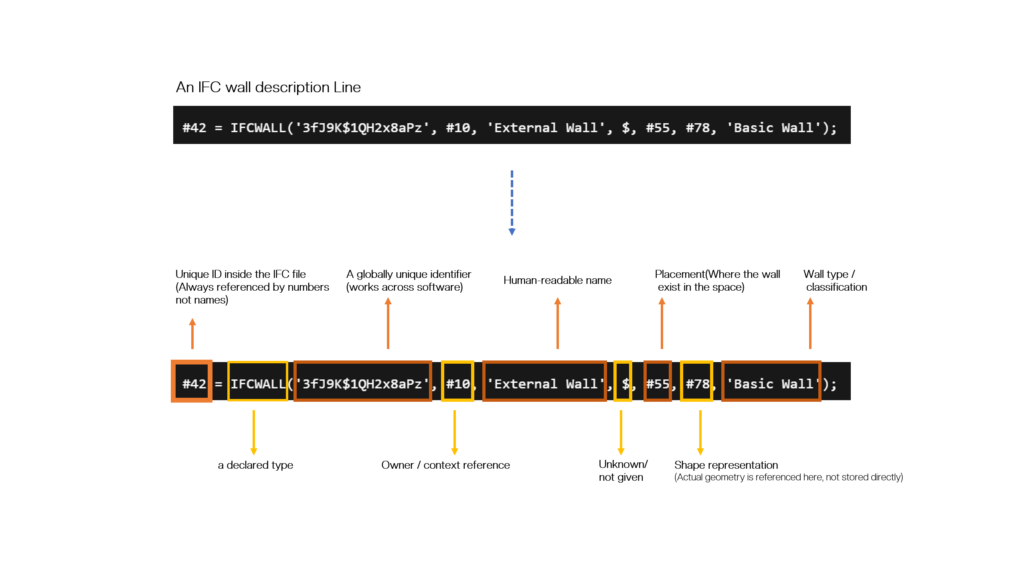
© 2026 Naveen Maria Fleming / ArchitectsWhoCode. Based on IFC schema by buildingSMART International
Elements: The Building Blocks
At its core, an IFC file contains building elements, things architects already work with every day.
Walls, slabs, columns, doors, windows, stairs, spaces etc. all of these exist inside the file.
But in IFC, these are not just shapes. Each object is explicitly defined by its role. A wall is not just geometry, it is identified as a wall with meaning attached to it.
This makes IFC more descriptive than purely visual.
Geometry: How Things Are Shaped
IFC files do store geometry, but not in the way native design software does.
The geometry describes size, shape, position, and orientation. However, it is not optimized for editing or smooth visualization. It exists to represent elements accurately, not to make them easy to modify.
This is why IFC models often feel heavier or less flexible when opened directly.
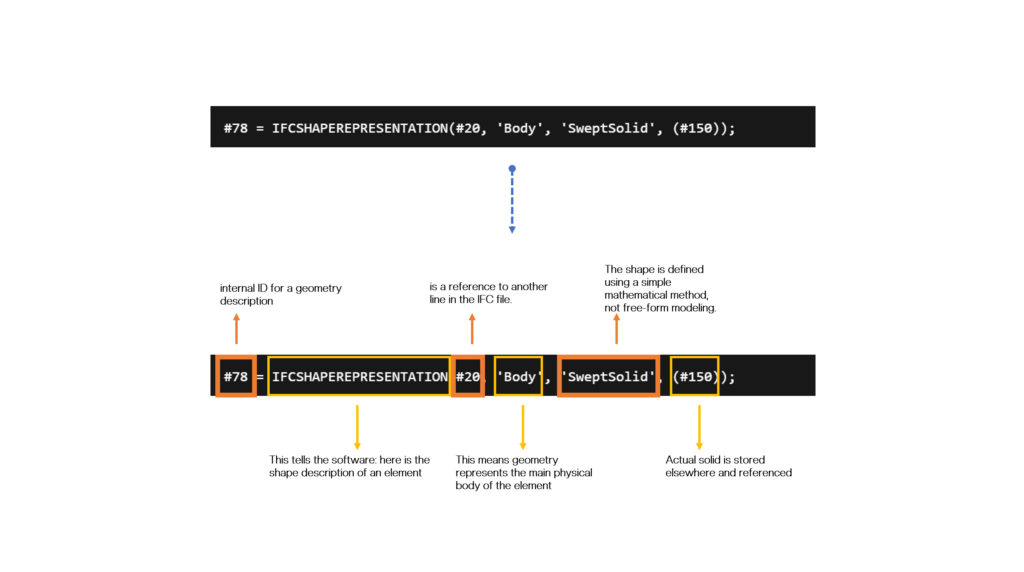
© 2026 Naveen Maria Fleming / ArchitectsWhoCode. Based on IFC schema by buildingSMART International
Properties: Information Attached to Elements
One of the most important parts of IFC is the information attached to elements.
These properties answer questions like:
- What material is this element made of?
- What level does it belong to?
- Is it load-bearing?
- Does it have a rating?
- What is the function of this space?
Instead of being hidden inside software-specific settings, this information is stored in a structured and standardized way so different tools can read it.
This is where IFC becomes much more than geometry.
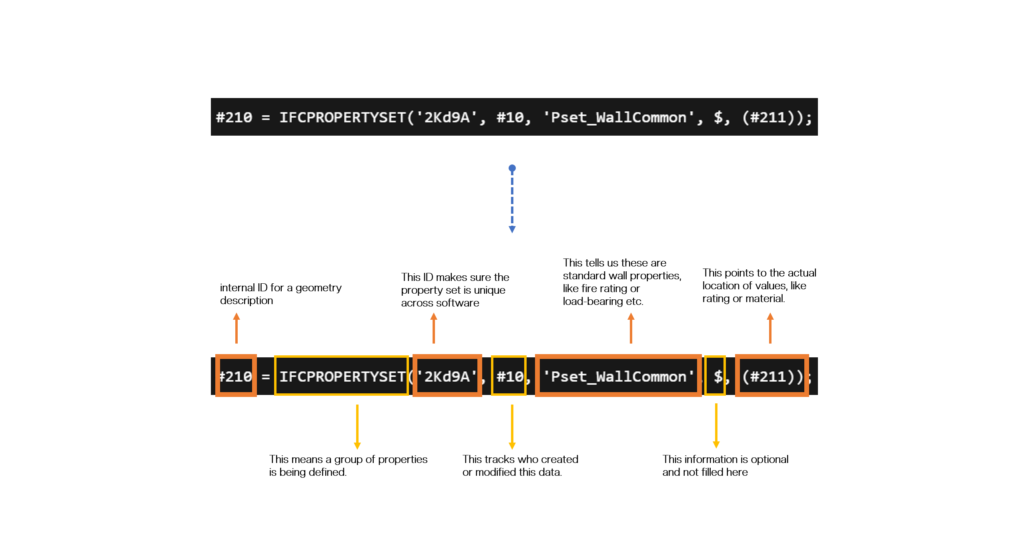
© 2026 Naveen Maria Fleming / ArchitectsWhoCode. Based on IFC schema by buildingSMART International
Relationships: How Everything Connects
What really defines an IFC file is not just the objects, but how they are connected.
An IFC file records relationships such as:
- Which elements belong to which storey
- Which doors are part of which walls
- Which spaces contain which elements
- How vertical elements connect different levels
Without these relationships, you would just have a collection of disconnected shapes. With them, you get an actual building system.
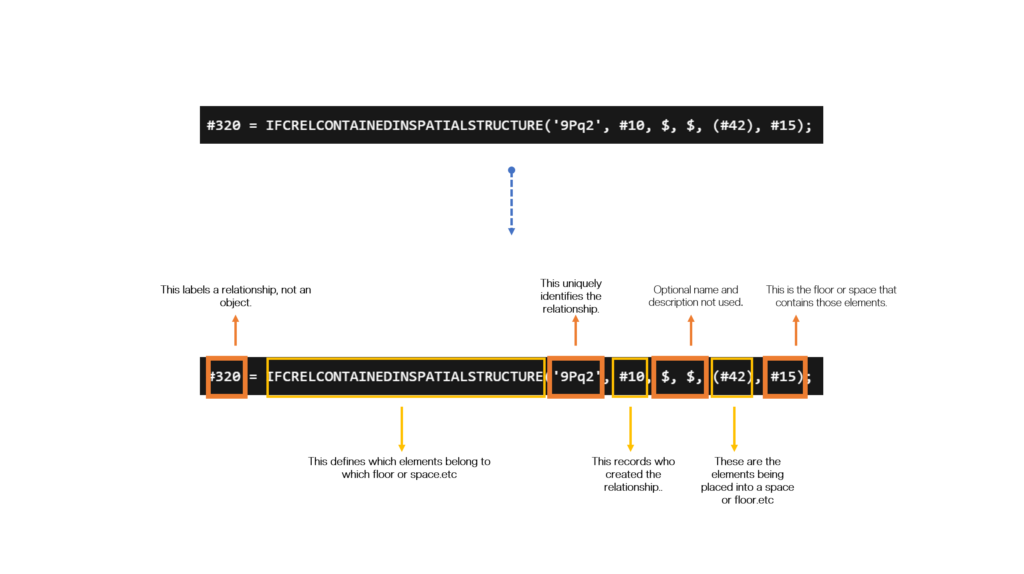
© 2026 Naveen Maria Fleming / ArchitectsWhoCode. Based on IFC schema by buildingSMART International
The Spatial Structure
IFC also organizes buildings into a hierarchy:
Site → Building → Storeys → Spaces
This structure gives context to every element. It tells us not just where something is, but where it belongs conceptually within the building.
Here’s the Part That Surprised Me
When I started looking deeper into IFC files, one idea really stood out to me.
An IFC file does not store information the same way native software does. It does not try to preserve everything exactly as it was modeled. Instead, it breaks the building down into a more fundamental, neutral structure.
The best way I can describe it is this:
An IFC file feels like a deconstructed LEGO model.
All the pieces are there. the elements, their sizes, their roles, and how they connect. But they are stored in a way that prioritizes understanding and exchange, not reconstruction of the exact original model.
This explains why IFC files often feel “different” when reopened. They are not meant to behave like native files. They are meant to describe the building clearly.
What This Means for Architects
Understanding how IFC works helps avoid a lot of the common frustration that comes with opening and using IFC files across different software.
IFC is not meant to behave like your native design model. You won’t get the same level of control or editability that you are used to in tools like Revit or other BIM tools. Instead, IFC focuses on clearly defining elements, storing consistent information, and maintaining relationships between elements in a way that can be understood across different platforms.
Because of this, it is better to treat an IFC file as a reference model or a source of data rather than something you directly remodel or heavily edit. When you approach it this way, many of the usual issues such as simplified geometry, missing parameters, or unexpected behavior start to make more sense.
Closing Thoughts
IFC files are often misunderstood because we expect them to behave like native models. In reality, they are structured differently and serve a different purpose.
They organize a building into elements, properties, and relationships, and connect everything through a system of references. This makes IFC especially useful for coordination, analysis, and data exchange, even if it is not ideal for detailed modeling.
When used with the right expectations, IFC becomes a reliable way to understand and communicate building information across different tools.
References
- buildingSMART International – Official IFC documentation
- IFC4 Specification: https://standards.buildingsmart.org/IFC/DEV/IFC4_3/
- Eastman, C. et al. (2011). BIM Handbook
- IfcOpenShell documentation: https://ifcopenshell.org
- ISO 16739 – Industry Foundation Classes